
Using CORE knowledge
How agents and operators should search, chunk-fetch, and respect site_visible knowledge rules.
Canonical rules for agents and site operators when CORE AI searches the shared CORE Australia knowledge index (and other entitled shared packages).
Agents: call get-knowledge-guide once per session before search-knowledge. This article is the searchable, human-readable version of those rules.
How to read platform guides
CORE sites are not identical. Many were provisioned long ago; plugins, roles, menus, branding, and CiviCRM settings may have been changed since bootstrap.
Articles describe how a standard CORE site is configured by default — not how every live site behaves today. When a guide lists plugins, menu names, tokens, or layout conventions, treat them as expected defaults unless your site has been reconfigured. Confirm before acting.
For site operators (what to expect)
CORE AI does not load every knowledge article into memory at once. It searches an index and receives excerpts (relevant passages). That is usually enough for how-to questions — but not for long checklists.
| Situation | What to ask the assistant |
|---|---|
| Quick how-to | “Search the knowledge base for …” |
| Launch review, DNS cutover, permissions audit | “Search for the guide, then open and work through the full article — don’t rely on excerpts alone.” |
| Answer feels incomplete | Say so — that is useful feedback. Ask it to fetch the full page. |
You can always read platform guides directly on this documentation site.
For agents (every session)
1. Bootstrap
get-knowledge-guide          # once per session — tags, access fields, tool shapes
search-knowledge { query }   # find relevant passages
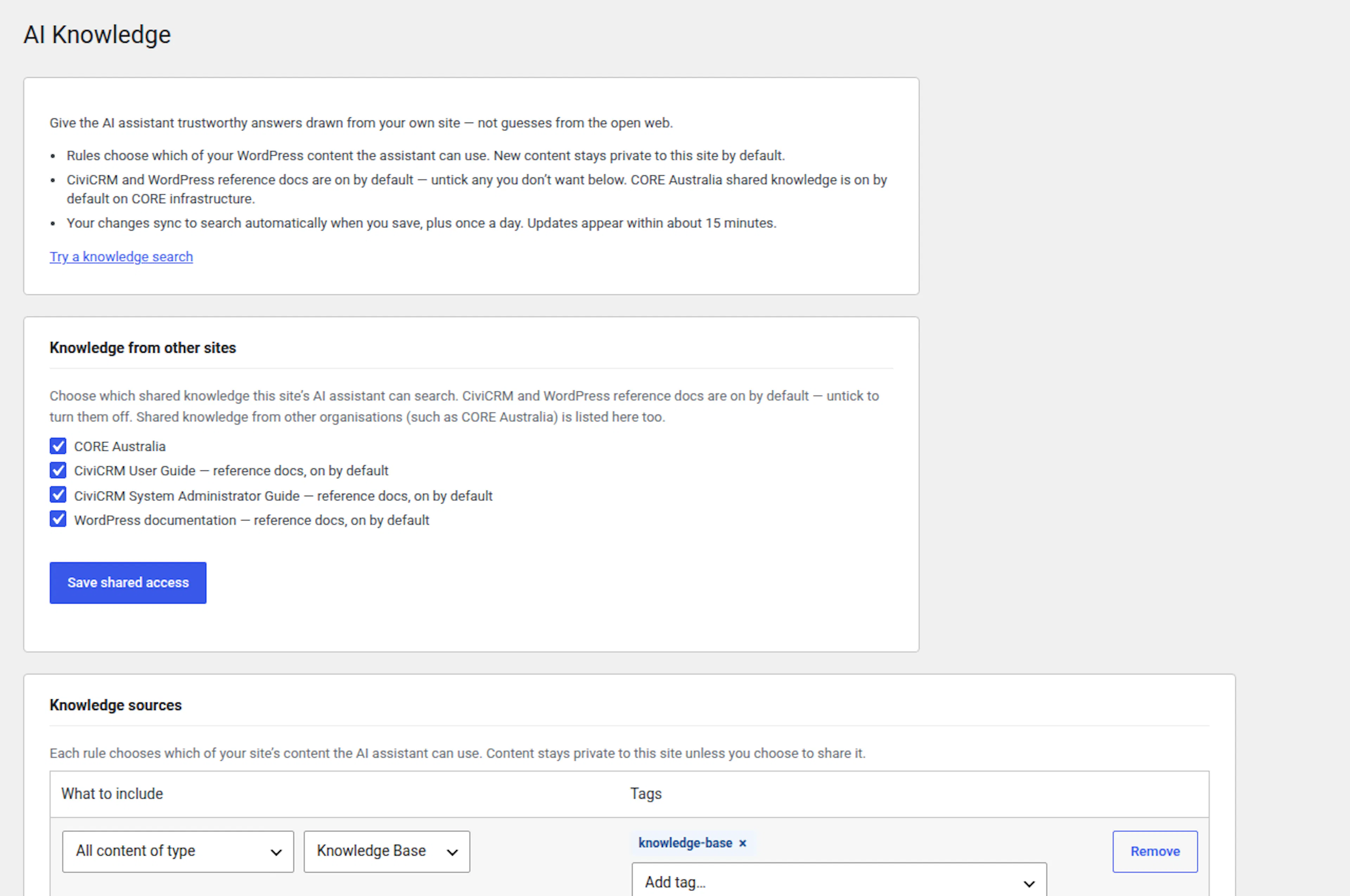
On client sites, also call get-site-context for site-specific facts (URLs, post IDs, standing instructions from wp-admin → CORE → AI: Knowledge).
2. Search returns chunks — not whole articles
| Tool | Returns |
|---|---|
search-knowledge | Best-matching chunk (markdown / excerpt) — may overlap; may omit sections |
get-knowledge | Full markdown for one post on this WordPress site (id + content_type) |
source_url******** on a hit | Full published page on the web |
Shared knowledge packages (articles exported from the central publisher) have no local post id on client sites — use source_url to load the complete article.
3. When you must fetch the full article
After search-knowledge identifies the right article, do not stop at chunks for:
- Checklists (pre-launch review, onboarding, go-live)
- Multi-step procedures (DNS, email, permissions, CiviCRM setup)
- Any task where missing one section changes correctness
How to load full content:
| Context | Method |
|---|---|
| Client / entitled site | Open hit source_url (Playwright snapshot, browser, or web fetch) |
| Site hosting the Echo KB article (publisher) | get-knowledge with Echo KB id + epkb_post_type_1, or source_url |
Note in your output (coverage notes) which sections you verified vs skipped.
4. Access and customer-facing copy
Every hit includes site_visible:
site_visible | Rule |
|---|---|
true | Safe to use in answers to site owners and the public |
false | Internal only — never quote or paraphrase in customer-facing messages |
search-knowledge and get-knowledge return an access_hint — read it.
5. Tags (narrow search)
Call get-knowledge-guide for the tag list on this site. Common filters:
| Tag | Use for |
|---|---|
knowledge-base | CORE Australia platform + member articles |
platform | Operator / agent workflows |
member-guide | Legacy members content |
mcp | MCP abilities and footguns |
documentation | Upstream CiviCRM / WordPress reference corpora |
Example: search-knowledge with tags: ["knowledge-base", "platform"].
6. Site facts vs shared knowledge
| Source | Contains |
|---|---|
| Shared knowledge (this index) | Generic workflows, patterns, checklists |
Site profile (get-site-context / wp-admin → AI Knowledge) | URLs, post IDs, org name, standing instructions for that site |
Never embed site-specific IDs or credentials in shared KB articles.
8. Content safety (shared KB is public)
Treat every published article as visible to all entitled sites and customer-facing AI.
| Never publish | Use instead |
|---|---|
| Client domains, staging hostnames, internal infra codes | your-site.example.org |
| API keys, tokens, passwords, credential files | Describe the setting name only |
| Post IDs, contact/case IDs in procedural steps | “your contact page”, “the donation form” |
| PII from support cases, exports, or screenshots | Fictional examples; redact images |
| Case transcripts, triage notes, agent session dumps | Operator-written, generic steps |
| Test card numbers, live merchant account IDs | “your payment processor” |
| Privilege bypasses or undocumented admin backdoors | Escalate to CORE operator |
| Internal hub admin (central operator console, Admin API, admin CLI) | “contact CORE support” — hub runbooks are not shared KB |
Audience: site owners and users working in their site's wp-admin and CiviCRM — not central CIB operator or infra tooling.
Site-specific facts stay in wp-admin → AI Knowledge (site profile) — not in shared knowledge.
Curators: run a content-safety audit before publish. Full rules: Managing Echo Knowledge Base and CORE operator curation guidelines.
9. When stuck
| Situation | Tool |
|---|---|
| User needs human help | get-support-guide → collect details → request-core-support |
| Missing MCP ability, unclear doc, process gap | report-agent-feedback — do not promise user follow-up unless severity=blocked |
Related articles
| Topic | Search hint |
|---|---|
| Platform guide index | agency workflows index |
| Connect Claude to your site | connecting claude |
| MCP setup and namespaces | mcp platform reference |
| MCP footguns (partial menu updates, etc.) | patterns mcp |
| Pre-launch checklist | pre launch review |
| Echo KB publish workflow | managing echo knowledge base |
Platform improvement (developers)
Session bootstrap: CORE AI should auto-call get-knowledge-guide (or inject this article) at MCP session start so agents do not skip chunk vs full-fetch rules.
Search UX: Consider signalling when a hit is a partial chunk of a checklist article (for example chunk_complete: false).